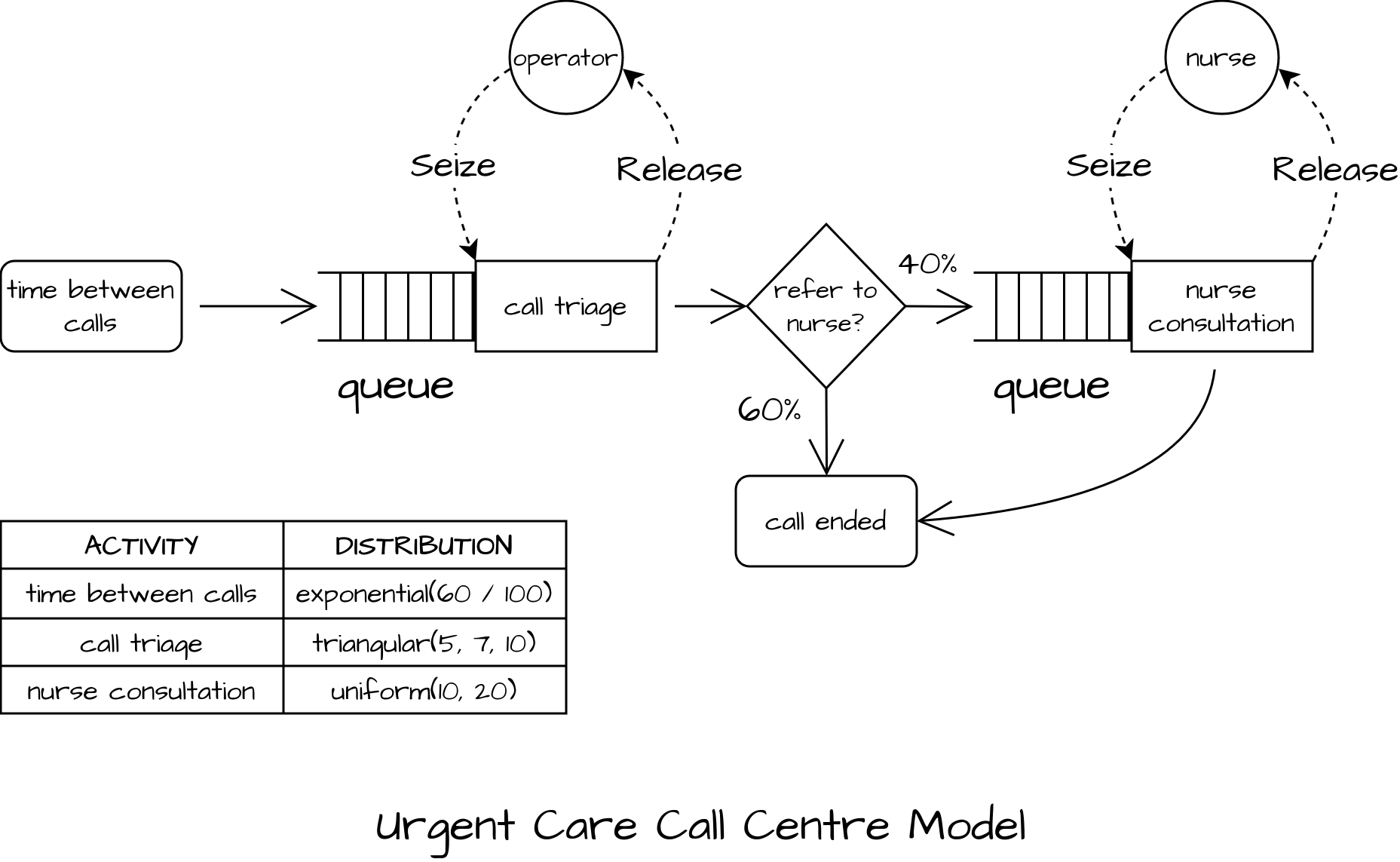
In this example, the model represents a simple urgent care call centre defined in Monks and Harper (2023).
Features of the model:
- Single random arrival process
- Two activities for call triage (by an operator resource) and nurse call back (by a nurse).
- Only 40% of patients require a nurse call back by default.
The JSON for this built-in example can be loaded using json2ciw.datasets.load_call_centre_model.
Imports
import json

import ciw
from rich import print

from json2ciw.datasets import load_call_centre_model
from json2ciw.engine import CiwConverter, multiple_replications
from json2ciw.results import summarise_results, tidy_to_wide_format
from json2ciw.schema import ProcessModel
Load JSON
json_call_centre = load_call_centre_model()
print(json.dumps(json_call_centre, indent=2))
{
  "name": "Call Handling Process",
  "description": "Discrete Event Simulation of a Patient call handling process.",
  "activities": [
    {
      "name": "Call Triage",
      "type": "activity",
      "resource": {
        "name": "Operator",
        "capacity": 13
      },
      "service_distribution": {
        "type": "triangular",
        "parameters": {
          "min": 5,
          "mode": 7,
          "max": 10
        }
      },
      "arrival_distribution": {
        "type": "exponential",
        "parameters": {
          "mean": 0.6
        }
      }
    },
    {
      "name": "Nurse Consultation",
      "type": "activity",
      "resource": {
        "name": "Nurse",
        "capacity": 9
      },
      "service_distribution": {
        "type": "uniform",
        "parameters": {
          "min": 10,
          "max": 20
        }
      }
    }
  ],
  "transitions": [
    {
      "from": "Call Triage",
      "to": "Nurse Consultation",
      "probability": 0.4
    },
    {
      "from": "Call Triage",
      "to": "Exit",
      "probability": 0.6
    },
    {
      "from": "Nurse Consultation",
      "to": "Exit",
      "probability": 1.0
    }
  ]
}
model_instance = ProcessModel(**json_call_centre)
ProcessModel(
    name='Call Handling Process',
    description='Discrete Event Simulation of a Patient call handling process.',
    activities=[
        Activity(
            name='Call Triage',
            type='activity',
            resource=Resource(name='Operator', capacity=13),
            service_distribution=Distribution(
                type='triangular',
                parameters={'min': 5.0, 'mode': 7.0, 'max': 10.0}
            ),
            arrival_distribution=Distribution(type='exponential', parameters={'mean': 0.6}),
            renege_distribution=None
        ),
        Activity(
            name='Nurse Consultation',
            type='activity',
            resource=Resource(name='Nurse', capacity=9),
            service_distribution=Distribution(type='uniform', parameters={'min': 10.0, 'max': 20.0}),
            arrival_distribution=None,
            renege_distribution=None
        )
    ],
    transitions=[
        Transition(source='Call Triage', target='Nurse Consultation', probability=0.4),
        Transition(source='Call Triage', target='Exit', probability=0.6),
        Transition(source='Nurse Consultation', target='Exit', probability=1.0)
    ]
)
model_instance.save_diagram("callcentre.mmd")
flowchart TD
    Arrivals_Call_Triage("Time between arrivals<br/>Exponential(mean=0.6)")
    Call_Triage["Call Triage<br/>('Triangular(5.0, 7.0, 10.0)',)"]
    Nurse_Consultation["Nurse Consultation<br/>Uniform(10.0, 20.0)"]
    Resource_Operator(("Operator<br/>(13)"))
    Resource_Nurse(("Nurse<br/>(9)"))
    Exit(["Exit"])

    Arrivals_Call_Triage --> Call_Triage
    Resource_Operator -.Seize.-> Call_Triage
    Call_Triage -.Release.-> Resource_Operator
    Resource_Nurse -.Seize.-> Nurse_Consultation
    Nurse_Consultation -.Release.-> Resource_Nurse
    Call_Triage -->|40%| Nurse_Consultation
    Call_Triage -->|60%| Exit
    Nurse_Consultation --> Exit
model_instance.get_distributions_df()
|
Activity |
Phase |
Distribution Type |
Parameters |
| 0 |
Call Triage |
Arrival |
Exponential |
mean=0.6 |
| 1 |
Call Triage |
Service |
Triangular |
min=5.0, mode=7.0, max=10.0 |
| 2 |
Nurse Consultation |
Service |
Uniform |
min=10.0, max=20.0 |
model_instance.get_routing_matrix_df()
|
Call Triage |
Nurse Consultation |
Exit |
| Source Activity |
|
|
|
| Call Triage |
0.0 |
0.4 |
0.6 |
| Nurse Consultation |
0.0 |
0.0 |
1.0 |
model_instance.get_resources_df()
|
Resource |
Activity |
Count |
| 0 |
Operator |
Call Triage |
13 |
| 1 |
Nurse |
Nurse Consultation |
9 |
Convert to ciw parameters
adapter = CiwConverter(model_instance)
network_params = adapter.generate_params()
print(network_params)
{
    'number_of_servers': [13, 9],
    'arrival_distributions': [Exponential(rate=1.6666666666666667), None],
    'service_distributions': [Triangular(lower=5.0, mode=7.0, upper=10.0), Uniform(lower=10.0, upper=20.0)],
    'reneging_time_distributions': [None, None],
    'routing': [[0.0, 0.4], [0.0, 0.0]]
}
Build and run the ciw model
network = ciw.create_network(**network_params)
sim = ciw.Simulation(network)
sim.simulate_until_max_time(50)
print("Quick simulation run worked!")
Quick simulation run worked!
Run the model for multiple replications
df_reps = multiple_replications(
    network,
    model_instance,
    num_reps=5,
    runtime=2880,
    warmup=1440,
    n_jobs=-1,
)

df_reps.head()
|
rep |
node_id |
activity_name |
resource_name |
resource_capacity |
n_service |
mean_wait |
mean_service |
utilisation |
mean_Lq |
| 0 |
0 |
1 |
Call Triage |
Operator |
13 |
2409 |
2.543220 |
7.309819 |
95.129252 |
4.254594 |
| 1 |
0 |
2 |
Nurse Consultation |
Nurse |
9 |
765 |
206.954675 |
14.990006 |
99.164671 |
109.944671 |
| 2 |
1 |
1 |
Call Triage |
Operator |
13 |
2370 |
2.795481 |
7.321618 |
93.117043 |
4.600896 |
| 3 |
1 |
2 |
Nurse Consultation |
Nurse |
9 |
773 |
224.244232 |
14.981693 |
99.525047 |
120.375549 |
| 4 |
2 |
1 |
Call Triage |
Operator |
13 |
2426 |
4.816395 |
7.323897 |
95.099958 |
8.114287 |
Summarise results
summary = summarise_results(df_reps)
summary.round(1)
| activity |
Metric |
Call Triage (Operator) |
Nurse Consultation (Nurse) |
| 0 |
Mean completed services |
2392.4 |
755.2 |
| 1 |
Mean waiting time |
3.5 |
230.1 |
| 2 |
Mean service time |
7.3 |
15.0 |
| 3 |
Mean utilisation |
94.1 |
99.3 |
| 4 |
Mean queue length |
5.8 |
120.6 |